Showing posts with label computer. Show all posts

Jun 24, 2012

Navigating the New Super-Highway

Let's be honest, today's lifestyle is so fast paced that it surprises me that we don't get more speeding tickets. I'm not talking about how you drive you car, but how you deal with the speed of the internet and how fast we can communicate with each other. This entry is based on my own personal thoughts on keeping connected to your life.

A key concern that we all have, is how to keep the work life separate from the personal life, especially if we travel a lot for work purposes. A simple solution to that, based on my perspective, is to buy a hard drive disk that works with your work laptop chassis. For the low cost of about $50, I could pack my personal hard drive in my carry on luggage, and using a small Phillips head screwdriver, could get online in the hotel, check all of my PERSONAL emails, Facebook, and search for whatever I wanted, without my company tracking it. If they are going to provide me with the tools to do my job, why not take advantage of that for personal reasons when I have to travel? Unscrew one or two small screws, slide out the company hard drive, slide in my personal one, and not worry about "big brother" watching me. I didn't have to lug a second laptop around with me to get through the TSA.
English: McDonalds' sign in Harlem.
English: McDonalds' sign in Harlem. (Photo credit: Wikipedia)

The second largest concern we have, is how to "get online." Having a smartphone helps, since most cell phone companies have them, but I want to view things in a larger perspective, and keep my phone bill low. Free wi-fi is available all around us. You just have to find some close to you. Sure, most hotel chains offer it now, but what do you do when you are in the middle of nowhere? Go to a Starbucks or McDonald's or even local library. Sure, you might have to buy a horrible tasting coffee or burger, but you get access to the internet. If you live in an apartment complex (like I do), consider going "halfsies" with a neighbor on the bill. You can both set up your own profiles, but cut your costs in half.

So, it comes down to the last point, "I'm not a geek, I don't want to work that hard, what can I do?" See the Portable Apps entry. My first iPod is now nothing more than a USB drive. But I use it more now than I did for my music. There are ways out there, to expand your horizon, that don't impede you. Embrace life...live it...connect in any way that you can.
Enhanced by Zemanta

Apr 26, 2012

Birdcage Liners Have Changed

As I sat here this morning booting up my laptop and HP Tablet, it struck me that times have changed. I'm just glad I've kept up with things, because I've changed too...maybe I'm just getting old... Naw, just learning new ways to keep in touch with the world.

I guess part of it is because I'm old enough to remember one of my first jobs, which was to hand-fold and hand deliver the Pittsburgh Press to my neighbors at the front door. Then once a month, ring the bell and ask them to pay me. I made sure to carry a box of dog treats in my heavy canvas bag so I could make doggy friends all over the neighborhood (and not get bit). Now remember, that was in the 80s so we didn't have iPods or MP3 players yet, but I wore out a LOT of cassette tapes in my Sony Walkman...

Now we fast forward to the early 2000s and a few of the changes I've noticed. Daily newspapers are delivered by adults in cars and put into the mailbox or the newspaper box out by the curb. My weekly free local newspaper is actually delivered by the US Post Office person in my mailbox with the junk mail and bills. Nobody rings a doorbell to collect, they send you a bill and you can pay it online. That must really cut down on the tips and Christmas bonuses that carriers get.

We have to jump to the next chapter of the Blu-Ray to bring us to today. My observation today was that I boot up my laptop and Firefox browser so my email, blog, and Facebook tabs open. I boot up the HP Tablet because my RSS Reader tab is there. All of them are prompting me for my ID and password, so I dutifully enter them so I can get access to my "news." I use the laptop to respond to the 5 email accounts, and "occasionally" log into Facebook. I use the HP Tablet to monitor my 15 subscriptions in Google Reader for my news. I use the tablet because I can walk around with it, sit on the porcelain throne with it, sit on the patio in front of a fire, and walk the dog with it. That is how I get news.

By using the Google Reader, it allows me to subscribe to news channels from all around the world and have one place to check for all of the blog entries that are made. It is efficient and allows me to see "at a glance" what is going on everywhere on Earth. While I strongly encourage you to learn about Reader and RSS subscriptions because it is more efficient, just keep in mind that you'll lose your newspaper.

Mar 30, 2012

500 Channels and Nothing Worth Watching

The Dick Van Dyke Show
The Dick Van Dyke Show 
(Photo credit: Wikipedia)

I'm old enough to remember when TV shows were mainly black and white (The Dick Van Dyke Show), I had to get up and manually turn the knob to go to the next channel, there was a difference between VHF and UHF, and tin foil made the picture better. Then we got cable and a "remote" to change the channel. Yeah, I remember the difference between Beta and VHS, now they call it "Blu-Ray." I keep up with the changes.

Mohu Leaf Indoor Antenna
Which is what leads me to the point of this entry. I've lived with cable TV for a LONG time so I could choose what I watched. But, as I look at my bank account and pay attention to the bills I pay every month, maybe it is time to discard my cable bill and pay attention to the "options" I have to watch what I want.  TV stations are now switching over from the old analog signal to the digital broadcast, and the top 20 shows on the tube are now available for free. I am considering switching to an HDTV antenna (like the Mohu Leaf) to receive the signals for my new 40" HD TV.

My neighbor got rid of his cable and has a similar antenna. He gets over 30 channels of the main networks. Click HERE to find what HDTV stations are available in your area. Combining that with Hulu and Netflix online, I can watch nearly everything that I already watch, but it won't drain my bank account as fast.  If I can't find anything to watch there, I can always go to the library and get DVDs (movies, TV shows, etc.) and keep them for 2 weeks at no charge.

Yeah, there are some changes in my future...maybe more gas in the car to travel more...

Jan 26, 2012

WiFi Redo

Before
I was catching up on my RSS feeds and came across this entry (Hidden Wireless Repeater) and it got my mind going...

While it was more than I "need" since I don't use a repeater, I do have a wireless connection to the iNet, but it was "bothering" me about how I had it situated on my end table. SO, I decided to give my living room an update by combining a working radio and my wireless connection point into one. Economy of scale, so to speak.

After
I took the screws out from the back of the radio (that I got from the dumpster), and because of all of the spare room, was able to place the wireless router into the body of the radio. Because it had a wood body, the signal was not diminished at all for my MacBook or my HP Tablet (thank you JJ McHugh for that). I cut a bit of the back of the radio so the power cable and the network cable would fit for the router, but it has helped me consolidate some things together, and make my living room more "visitor friendly."

Jan 25, 2012

Science Fair Project - Jan 2012

Yes...unfortunately it is that "help your kid make the BEST science fair project ever." I survived this weekend working on the one with my son, and to attempt to make it easier for YOU, I'm sharing it. He had to "choose" what project he would attempt, and of course we went to the internet for some ideas. He made his "final choice" on Human Battery Power Science from this website. Don't scroll too much, if you want some ideas for yours, click on the link, and then go to the home page (okay, here is the HOME page of it).


The "point" of this one was listed as following (yeah, I copied and pasted it):


Purpose

To demonstrate that a human body can be used as a battery by producing an electrical current.

Additional information

Batteries are devices that store chemical energy and convert it to electrical energy. Consisting of one or more voltaic cells, batteries come in various sizes and forms and are integrated into most electronic and portable devices. 
___________________________________________________________________________________


We studied the Required Materials list, and had to figure out where to get them. We found the copper and aluminum plates at Hobby Lobby ($12 total); the  0-15VDC meter  and the pre-wired alligator clips at Radio Shack (meter was $13, clips were $7, a franchise store carries more than company stores). I had lumber/wood in the garage so it didn't "cost" anything, but if had to price it out, it would be about $4.00 total. We went to Home Depot to get the plate mounting screws (stainless steel to prevent oxidation) since I wanted the least "conductive" ones & was fresh out of them (cost $2, and I actually used a $2 bill to pay).


So, we built it according to the directions. And conducted some personal tests. Here are the results:


When conducting the experiment as is listed on the website above, it will show the results you desire.
 If you "alter" the experiment a little, you will discover some more.
I recommend the "wet hands" version because we all know that water conducts more electricity.
Don't paint or stain the wood, since those components add a "variable of conductivity" into the experiment. Bare wood doesn't, and makes it all easier for you as a parent.
Mount the panels with a 1/4" overhang on the wood to connect the clips to.
PRACTICE  the presentation several times. Your scientist-to-be needs to be comfortable with what they are showing and presenting. 
Start the presentation by clipping a 9 volt battery, to demonstrate that the meter works. When you get to the "hands-on" part, you will show that the electricity reading is less, but the audience knows that the meter works.


Bottom line, by using an analog meter (NOT digital) impacts observers more, and I learned that the human body can generate an electric charge of about .5 volt DC charge....

Jan 7, 2012

WYSIWYG & HTML

Computers and the internet have certainly changed in the last few decades. I reference my experiences with computers on my entry of Computers, but in trying to get my DIY Colored Fireplace Pinecone entry done, it brought something to my attention about blogging.

A picture of a non-WYSIWYG-editor. (it's HTML)
Image via Wikipedia
Writing a blog entry is a lot easier now than it was in the past, due to the "interface" that you use to compose it. Most blog servers have been kind enough to develop their sites so we can use WYSIWYG interaction to give life to the thoughts and feelings that we have, and I thank them for that. But, occasionally I want to make my entry look a certain way, and there aren't easy ways to use a button or simple "right click" to make that happen. Fortunately, they let a writer use an HTML editing way to make it happen, kind of like a DIY tab.

What prompted this blog entry is that I wanted to put a table on the pinecone entry as a better way to share information in a concise way, but my interface didn't have an "insert table" button to make it happen. I had to switch from the WYSIWYG tab over to the HTML tab, and manually code the information to make it happen using a combination of the '< table >' codes. While my first emotional inclination was to swear ferociously at the blog host for NOT having that option, it struck me that I should be happy that I've still stayed in touch with things to know "how" to make something happen that I desire, and then be able to achieve it.

Fortunately I paid attention to life in the late 70s to get involved with computers. And was inspired to be a writer, later in my life during the 80s. I knew the internet would be a way to touch the world as it evolved. I composed my first website in the late 80s by coding HTML in Windows 1.0 Notepad by typing HTML code and uploading it via a Prodigy account and the telephone. Now, I can use a wireless account on my MacBook INSTANTLY. Progress is a good thing. But knowing the base foundation back story helps.

Bottom line, I recommend that people learn a little HTML code to help them achieve their goals.
Enhanced by Zemanta

Jan 4, 2012

Computers

Computers have come a LONG way in the last 40 years. I started playing with computers back in the late 70s. My first experiences were on a Radio Shack TRS-80 Model III/IV. That was when we had to use 5.25" floppy disks (and yes, they actually WERE floppy). I learned how to draw the flowchart of the programs I wrote and how to use an hole-punch to use both sides of the disks. I still have my disk carrying case with the old disks in them. Hmm... I wonder if they still work...

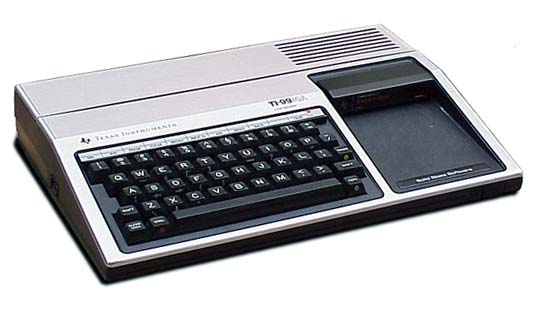
I was working as an apprentice to a master carpenter and saved my money to buy my first personal computer. I got a TI 99/4A even though a lot of my friends were going with the Commodore 64. I remember that I had to also purchase a small 13" black and white TV to use as a monitor and used an old Sears & Roebuck cassette tape recorder to store my data on. I actually think I still have that tucked away somewhere and all of the cassettes too. But, I don't have the TI99/4A anymore. It was chucked into the dumpster when I had to move, and didn't feel like carting it with me.

I went to college and actually minored in "computer technology" for a while. So, I lived through the 8086, 8088 and 80286 generations. And all of the chip mutations in between. I coded in PASCAL, COBOL, BASIC, and on the UNIX system. I drank a LOT of coffee back in those days. I relished when a meal consisted of a set of Pop-Tarts and a Jolt with a set of Vivarin in it. I miss Jolt...

Anyway... I spent nearly 20 years with a corporation working on an a PC system, and stuck in Windows. I still have the Windows 3.11 installation disks and several versions of DOS. I've suffered through all of the permutations that they've had, threw my last Toshiba against the wall and stomped on it in the driveway, and got a Mac. I'll never go back to PC.

I got to experience the Apple, the Apple II, the Apple IIc, and the Apple IIe... But they weren't "approved" at the company I was with. I currently own and use an Apple MacBook Pro, and will NEVER go back to PC.